> ## Documentation Index
> Fetch the complete documentation index at: https://docs.gettrillion.ai/llms.txt
> Use this file to discover all available pages before exploring further.
# Decisions
> How your AI works a decision through Trillion's method: open it, answer each question, then decide, and where the result shows up afterwards.
When you ask your AI whether to do something, which option to pick, or what to work on next, it can work the answer through Trillion's decision method instead of guessing. You do not call anything yourself. You ask in plain words ("help me decide whether to raise my price", "which of these three should I do first?") and your AI opens a decision, answers the method's questions, and records the choice.
 ## How a decision runs
It calls `start_decision` with the goal in your words, the facts it has so far (each fact gets a short name the answers can point back to), and at least two options. It can pick a method made for the subject, or leave that out and use the one that works for anything. Opening a decision decides nothing: it only returns the first question.
Your AI answers one question at a time with `answer_question`. Every answer has to point at the facts it rests on. When a question is about you (what you value, whether this is worth your time, what keeps you going), the method expects your own words and records that they came from you. If a fact turns out to be wrong, your AI corrects it or takes it back with `revise_evidence`, and every change is logged.
When no question is left, your AI calls `decide` with the option chosen, the reason, the facts behind it, the next action, and how success will be measured. Sending the same decision again changes nothing.
Later, your AI records what actually happened with `report_result`: it worked, it did not, or it is not known yet, in your words. A decision that did not work is not a dead end: the next decision starts from that finding.
A decision left open is unfinished. Trillion tells your AI to answer every question and decide in the same turn, and to leave a question to you only when the answer depends on your own values, drive or budget.
## What the method checks
The method walks the same steps for any subject, from a business to a meal to a piece of software. Each step asks one thing:
| Step | What it asks |
| - | - |
| Scope | What kind of decision is this, and which deeper checks apply? Every check left out needs a reason. |
| The change | Who or what is in which state now, and which state should it end up in? |
| Worth it | Is the change true to the facts, worth your limited time, and something you have lasting drive for? |
| Demands | What demands is this working under, who set each one, and which survive? |
| What exists | What already exists, what is the best example elsewhere, and what gap is left? |
| Root cause | Asked why at least three times: which deepest cause can you change? |
| Drop | Which demands or steps can be dropped? |
| Rule out | Which options does a fact already rule out? |
| Who can do it | Who or what already in place can do this? |
| Combine | What else does this unlock when combined with what you have? |
| Smallest move | What is the smallest move that reaches the result? |
| Sooner | What would make the result arrive sooner, and what can happen today? |
| Runs by itself | Once it works by hand, which part should then run by itself? |
| Risk | What could go wrong for trust, privacy, recovery, or doing it twice, and how will each be tested? |
| Words | What exact words will people see or hear, and can every claim be pointed to? |
| The real change | What real thing must change, and what fresh look will show it happened? |
| Proof | What shows success, what shows failure, and when and by whom will it be checked? |
The scope step picks which deeper checks apply. There are ten, such as "does something already exist that could do this?", "could this hurt someone or be hard to undo?" and "will people read the words that come out of this?". Leaving one out is allowed only with a reason that fits the decision. Behind those steps sit several hundred specific checks that your AI either handles or explains why they do not bear on this decision.
### Methods for particular subjects
Besides the method for any decision, there are methods in the words of particular subjects: cooking, a relationship, changing software, and tennis. Your AI lists them with `list_methods`. Each one keeps the same steps and checks.
## Where decisions show up
Every decision your AI made with Trillion, and what is waiting for your answer.
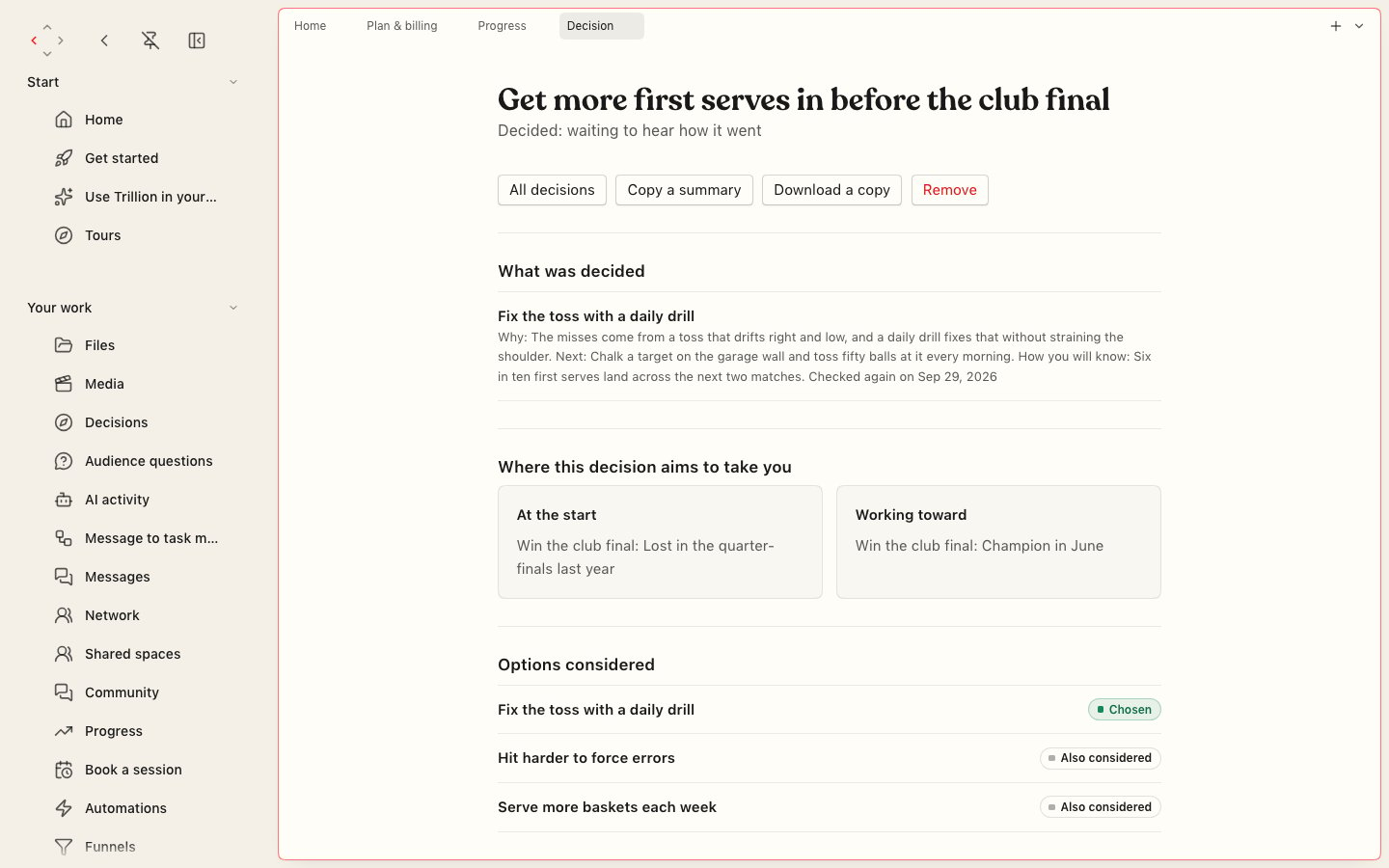
What was decided, its results and notes, and how it was worked through. Copy a summary, download a copy, or remove it.
Home shows what is waiting for your answer and your recent decisions. Progress counts your decisions and how many hit their goal.
Any AI signed in to your account can list your decisions, pick one up where it was left, or export it whole. With the decisions hook, Claude Code and Codex see new decisions at the start of each turn.
A decision is always in one of four states:
| State | What it means |
| - | - |
| Open | Not decided yet. |
| Waiting for the result | Decided, waiting to hear how it went. |
| It worked | The result was checked and it worked. |
| Needs a new decision | It did not work. That result is a finding; the next decision starts from it. |
## What you get on each plan
On the free plan your AI walks a few decisions a month through the method, and nothing is kept. A paid plan keeps every decision, note and result on your account, brings your past decisions back when a similar one comes up, and shows how other people's similar decisions turned out (anonymous, never naming anyone).
Decisions are also the gate in [Decide before building](/harness/decide-before-building), a hook that stops Claude Code or Codex from changing files until it has decided with Trillion in the same turn.
For every decision tool and its inputs, see the [decisions reference](/reference/decisions).
This documentation is built and hosted on [Mintlify](https://mintlify.com), a developer documentation platform.
## How a decision runs
It calls `start_decision` with the goal in your words, the facts it has so far (each fact gets a short name the answers can point back to), and at least two options. It can pick a method made for the subject, or leave that out and use the one that works for anything. Opening a decision decides nothing: it only returns the first question.
Your AI answers one question at a time with `answer_question`. Every answer has to point at the facts it rests on. When a question is about you (what you value, whether this is worth your time, what keeps you going), the method expects your own words and records that they came from you. If a fact turns out to be wrong, your AI corrects it or takes it back with `revise_evidence`, and every change is logged.
When no question is left, your AI calls `decide` with the option chosen, the reason, the facts behind it, the next action, and how success will be measured. Sending the same decision again changes nothing.
Later, your AI records what actually happened with `report_result`: it worked, it did not, or it is not known yet, in your words. A decision that did not work is not a dead end: the next decision starts from that finding.
A decision left open is unfinished. Trillion tells your AI to answer every question and decide in the same turn, and to leave a question to you only when the answer depends on your own values, drive or budget.
## What the method checks
The method walks the same steps for any subject, from a business to a meal to a piece of software. Each step asks one thing:
| Step | What it asks |
| - | - |
| Scope | What kind of decision is this, and which deeper checks apply? Every check left out needs a reason. |
| The change | Who or what is in which state now, and which state should it end up in? |
| Worth it | Is the change true to the facts, worth your limited time, and something you have lasting drive for? |
| Demands | What demands is this working under, who set each one, and which survive? |
| What exists | What already exists, what is the best example elsewhere, and what gap is left? |
| Root cause | Asked why at least three times: which deepest cause can you change? |
| Drop | Which demands or steps can be dropped? |
| Rule out | Which options does a fact already rule out? |
| Who can do it | Who or what already in place can do this? |
| Combine | What else does this unlock when combined with what you have? |
| Smallest move | What is the smallest move that reaches the result? |
| Sooner | What would make the result arrive sooner, and what can happen today? |
| Runs by itself | Once it works by hand, which part should then run by itself? |
| Risk | What could go wrong for trust, privacy, recovery, or doing it twice, and how will each be tested? |
| Words | What exact words will people see or hear, and can every claim be pointed to? |
| The real change | What real thing must change, and what fresh look will show it happened? |
| Proof | What shows success, what shows failure, and when and by whom will it be checked? |
The scope step picks which deeper checks apply. There are ten, such as "does something already exist that could do this?", "could this hurt someone or be hard to undo?" and "will people read the words that come out of this?". Leaving one out is allowed only with a reason that fits the decision. Behind those steps sit several hundred specific checks that your AI either handles or explains why they do not bear on this decision.
### Methods for particular subjects
Besides the method for any decision, there are methods in the words of particular subjects: cooking, a relationship, changing software, and tennis. Your AI lists them with `list_methods`. Each one keeps the same steps and checks.
## Where decisions show up
Every decision your AI made with Trillion, and what is waiting for your answer.
What was decided, its results and notes, and how it was worked through. Copy a summary, download a copy, or remove it.
Home shows what is waiting for your answer and your recent decisions. Progress counts your decisions and how many hit their goal.
Any AI signed in to your account can list your decisions, pick one up where it was left, or export it whole. With the decisions hook, Claude Code and Codex see new decisions at the start of each turn.
A decision is always in one of four states:
| State | What it means |
| - | - |
| Open | Not decided yet. |
| Waiting for the result | Decided, waiting to hear how it went. |
| It worked | The result was checked and it worked. |
| Needs a new decision | It did not work. That result is a finding; the next decision starts from it. |
## What you get on each plan
On the free plan your AI walks a few decisions a month through the method, and nothing is kept. A paid plan keeps every decision, note and result on your account, brings your past decisions back when a similar one comes up, and shows how other people's similar decisions turned out (anonymous, never naming anyone).
Decisions are also the gate in [Decide before building](/harness/decide-before-building), a hook that stops Claude Code or Codex from changing files until it has decided with Trillion in the same turn.
For every decision tool and its inputs, see the [decisions reference](/reference/decisions).
This documentation is built and hosted on [Mintlify](https://mintlify.com), a developer documentation platform.